| Anatomy of a Page Layout | 
|

|

|

|

|

|
Page layouts created using the Statement Designer are made up of the following three sections:
Below is an image of a sample page layout, which shows where each section of the page layout begins and ends. The labels in this example assume that the left and right guidelines have been configured to match the left and right margin specified in Page Setup for the statement printer.
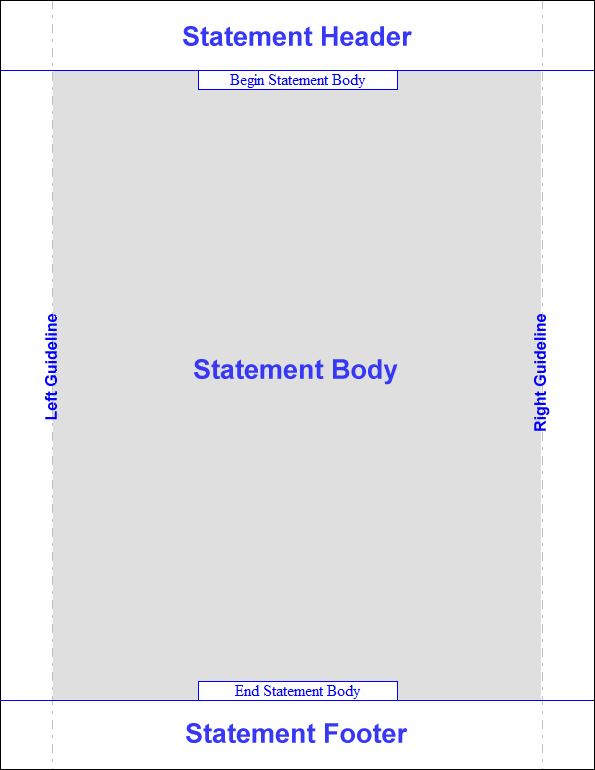
The statement header section is at the top of the statement, and spans the entire width of the page layout. Fields such as the firm name and address, client name and address, statement number, statement date, etc. are commonly placed in the statement header. The statement header might also include the firm's logo or other artwork.
The statement body section is in the center of the page layout, and spans from the end of the header section to the beginning of the footer section, as well as from the left margin specified in Page Setup for the statement printer to the right margin specified in Page Setup. It is in the statement body that the information about the client's accounts receivable and current work will print. The statement body is generally left empty on the page layout, since anything included in the statement body has the potential to print in the same location as the transactions and other statement information. However, an image placed in the body might serve as a watermark or a background for the statement.
In some cases, you may even want to place elements to the left and/or right of the statement body. Provided that no elements are placed beyond the printer's minimum margins, this is another way in which you can customize the appearance of your page layout.
Note: The left and right edges of the statement body are controlled by the left and right margins specified in Page Setup for the statement printer, NOT by the left and right guidelines. For this reason, it is strongly recommended that the left and right guidelines be configured to match the left and right margins specified in Page Setup, as illustrated above.
The statement footer section is at the bottom of the statement, and spans the entire width of the page layout. The page number and text boxes that include messages to the client are two examples of elements that are commonly included in the statement footer section.
 ) are registered trademarks of Software Technology, LLC.