| Rounded Time Increment | 
|

|

|

|

|

|
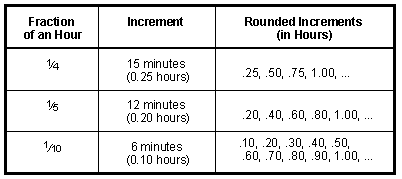
Enter any length of time between 0.01 and 1.00 hours. The Increment field allows you to specify the portion of an hour that you want the time elapsed rounded to. For example, an Increment of .10 will round up an elapsed time of 25 minutes (i.e., 0.42 hours) to .50 hours. As another example, an Increment of .25 will round up an elapsed time of 36 minutes (i.e., 0.60 hours) to .75 hours. Entering 0.01 will result in the actual time elapsed being added to the Hours fields.
 ) are registered trademarks of Software Technology, LLC.