| Minimum Time | 
|

|

|

|

|

|
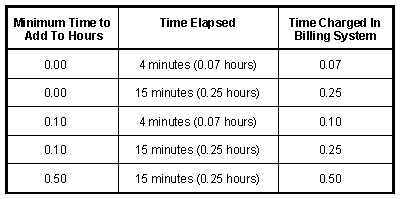
Enter any length of time between 0.00 and 1.00 hour. This option allows you to specify a minimum time to be added to the Hours fields if the elapsed time is not greater than the minimum time that you specify. For example, let's say you specify ".25" as the minimum time (i.e., one quarter of an hour or 15 minutes) and you only spend six minutes on a phone call. When you tell the program to add the elapsed time to the Hours fields, the minimum time of .25 will be added to the Hours fields instead of the actual one-tenth of an hour elapsed time (6 minutes). Entering 0 will result in the actual elapsed time being added to the Hours fields.
 ) are registered trademarks of Software Technology, LLC.