| Task Based Billing Overview | 
|

|

|

|

|

|
Task based billing is a method of billing that is often mandated by insurance companies and large corporations that require billing information to be submitted in a uniform manner. This allows them to easily compare and analyze billing information from all firms submitting bills. The Uniform Task-Based Management System was used to implement task based billing in Tabs3.
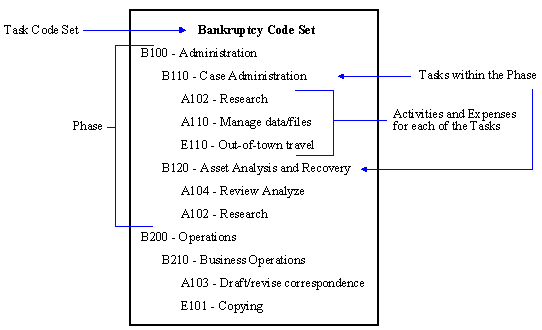
The task based billing concept is hierarchical in nature. At the topmost level is a task code set. Each task code set corresponds to a general classification of work such as Bankruptcy or Non-Litigation Counseling.
Within each task code set, there are phases that occur throughout the duration of a case. For example, in a bankruptcy case, there might be a phase for administration and a phase for operations. Within each phase, there may be tasks which represent more detail for the particular phase. Tasks are generally associated with tangible work accomplished. Examples of tasks within the administration phase of a bankruptcy case include "case administration," "asset analysis and recovery" and "asset disposition." Each phase or task is assigned a four- or five-character code comprised of the task code set one- or two-letter combination, which is followed by a three-digit number. Budget amounts can optionally be specified for each task or phase.
Finally, for each task there are activities that are performed and expenses that are incurred. Activities generally describe how work within a phase or task is accomplished. Examples of activities include "plan and prepare," "research" and "draft/revise." Expenses are costs for the phase such as "copying" and "court fees." Activities and expenses are common for all task code sets. In other words, the activities used for the Bankruptcy task code set are the same as the activities for the Non-Litigation Counseling task code set. Like phases and tasks, each activity is assigned a four-character code. For activities, this code consists of the letter "A" (Activity) followed by a three-digit number. For expenses, this code consists of either the letter "X" (Expense) or "E" (Expense) followed by a three-digit number.
During data entry for task based billing clients, you must specify a task or phase code as well as an activity or expense code. Once data entry is complete, the task based billing information is saved to a disk file (using the Task Code Billing Report and/or statements in Tabs3) and provided to the client. The client can then track the amount of time spent and expenses incurred on each activity within each task.
Task Based Billing Information on Statements
When generating a statement for a client who is set up for task based billing, the task code and activity/expense code can be included for each detailed transaction similar to the following:
10/06/21  L110 A102 Research Hapton v. Interstate Insurance.

          L110 A103 Draft/revise response to complaint.
Furthermore, a Task Code Summary similar to the following can be included on all statements for task based billing clients at the end of the statement. Notice that subtotals for each phase are included in this Recapitulation.
                   Task Code    Summary
			                    Fees   Expenses
L110 Fact Investigation/Development           187.50      60.00
L120 Analysis/Strategy                         37.50       0.00
L130 Experts/Consultants                      150.00       0.00
                                              ------      -----
L100 Case Assessment, Development and Admin   375.00      60.00

L250 Other Written Motions and Submissions    150.00       6.75
                                              ------      -----
L200 Pre-Trial Pleadings and Motions          150.00       6.75
Both the task codes and the Task Code Summary are shown if the Task Based Billing Information check box in the Print section of the Options tab of the Generate Statements program is selected.
Note: The Task Code Summary heading can be changed via the Statement Customization Terminology tab in Line 76.
Note: In order for Task Code Summary and budgeting to be printed correctly, a Task Code corresponding to each phase must be entered. For the above example, if L100 was not defined, the recapitulation following L110, L120 and L130 would display "L100 ***Task Code Not Found***".
It is important to remember that if your firm is performing work for a company that requires task based billing information, the individual task code sets, phases, tasks, and activities will be provided to you. The Sample Report Pack includes examples of task code sets, phase/task codes, activity codes, and expense codes suggested by the Uniform Task-Based Management System.
Note: Some clients may require additional customized information in a very specific electronic format. An optional software product called Taskbill is available that exports billed fee and cost transactions from Tabs3 to an electronic format. Taskbill does not create reports of any kind, nor is it meant to provide a way to implement task based billing in Tabs3. The sole purpose of the Taskbill program is to export data into an ASCII file that is mapped to a specific company's required file format. Currently, the Taskbill program exports data to over 100 different predetermined file formats. A complete list of formats can be found on our website at Tabs3.com/products/tabs3_taskbill/taskbill.html. Contact the consultant from which you purchased the software or our Sales Department if you would like more information regarding Taskbill.
| See also: | Setting Up Task Based Billing in Tabs3 |
| Reports Associated with Task Based Billing | |
| Methods of Billing | |
| Knowledge Base Article R10435 - Tabs3 Taskbill Product Information | |
| Knowledge Base Article R11737 - Configuring and Using Taskbill |
 ) are registered trademarks of Software Technology, LLC.