| Popup Calculator | 
|

|

|

|

|

|
When editing number or amount fields in all Tabs3 Software, a popup calculator is available. The popup calculator is opened when "M" (Math) or any mathematical operator (+, -, *, /, or =) is pressed in a number or amount field. When activated, the popup calculator is graphically displayed as calculator tape that extends above the field.
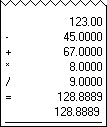
The following keystrokes can be used in any number or amount field to activate and use the popup calculator.
| M | Displays the popup calculator. |
| + | Adds the next entered number. |
| - | Subtracts the next entered number. When entered at the beginning of the number, makes the number negative. |
| * | Multiplies by the next entered number. |
| / | Divides by the next entered number. |
| = | Displays the current total on the calculator tape. |
| Enter | Closes the calculator tape and enters the new total. |
| Esc | Closes the calculator tape and ignores the new total. |
Clicking outside the calculator tape will close the calculator and enter the new total in the field.
Note: The popup calculator is not available for lookup fields (e.g., Timekeeper, Client ID, Tcode, etc.).
| See also: | Calculator Usage Examples |
 ) are registered trademarks of Software Technology, LLC.